Your books, up to date on every device
Add sync to use your books on a second device, and share them with your accountant or a business partner.
Sync adds a copy in the cloud and keeps the business up to date on up to five devices. Press Turn on sync in the status bar, and it reads Synced when everything is up to date. A change you save on one device shows on the others.
Share a business with your accountant or a business partner. They can just view, or make changes too. You share it on the website, and they open it from the cloud and see your latest books.
Sync and sharing need a sync subscription, and a license you buy includes its first year.
Sync across devices
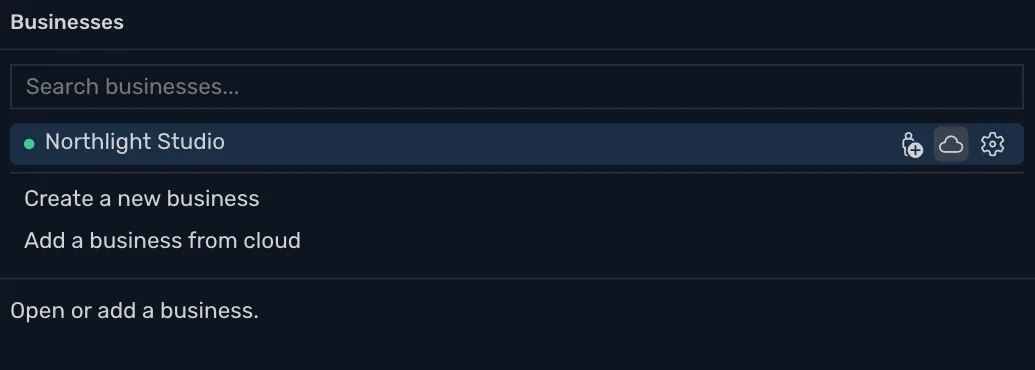
Keep a business up to date on up to five devices, with a copy in the cloud that is also a backup. A change on one shows on the others. To use a second Mac or PC, sign in, press Add a business from cloud and choose the business. Sync needs a subscription, which you buy on your account page after you sign in.
Share with your accountant
Share your books with your accountant or a business partner from the website, and they see your latest books. They can just view, or make changes too. Viewing is free for them. To make changes, they need their own subscription.
When you both change the same thing
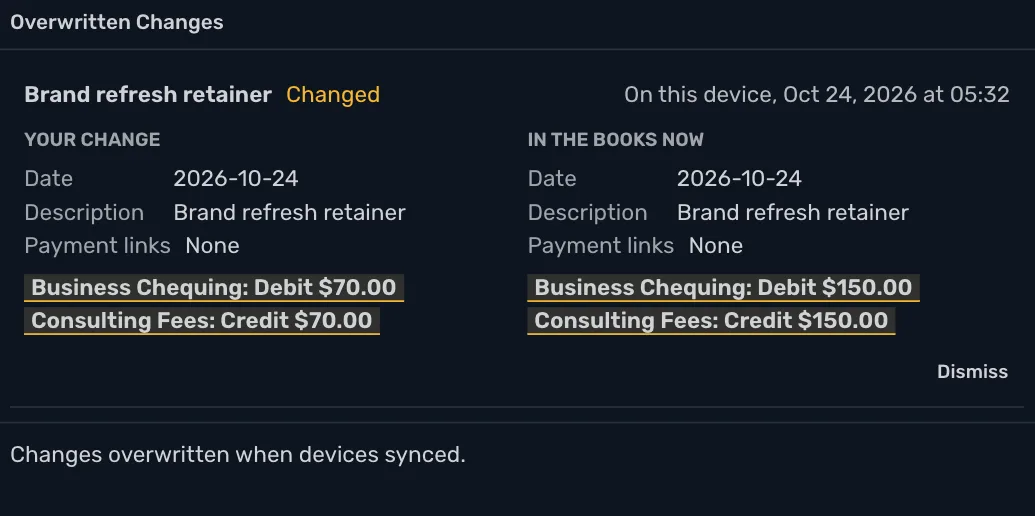
If you and your partner both change the same transaction, whoever saves first wins. The other person gets a message letting them know, and Show Me puts their change beside what is in the books now.
Works offline
With no connection the status bar reads Offline and you keep working. Everything is saved on your device first, and changes sync when the connection is back.
Stop sync any time
Stop sync on this device from the Businesses window, and the business is local again. Its copy in the cloud is kept, your other devices keep syncing, and nothing is deleted.
30 days free, no account or credit card required.