Monthly Breakdown
See income and expenses month by month, and which month was best.
The Monthly Breakdown is the Profit & Loss with a column for each month. Use it to see which month was best, and whether sales or spending are moving.
Open the Monthly Breakdown
Press the Reports icon, then Monthly Breakdown under Financial Statements.
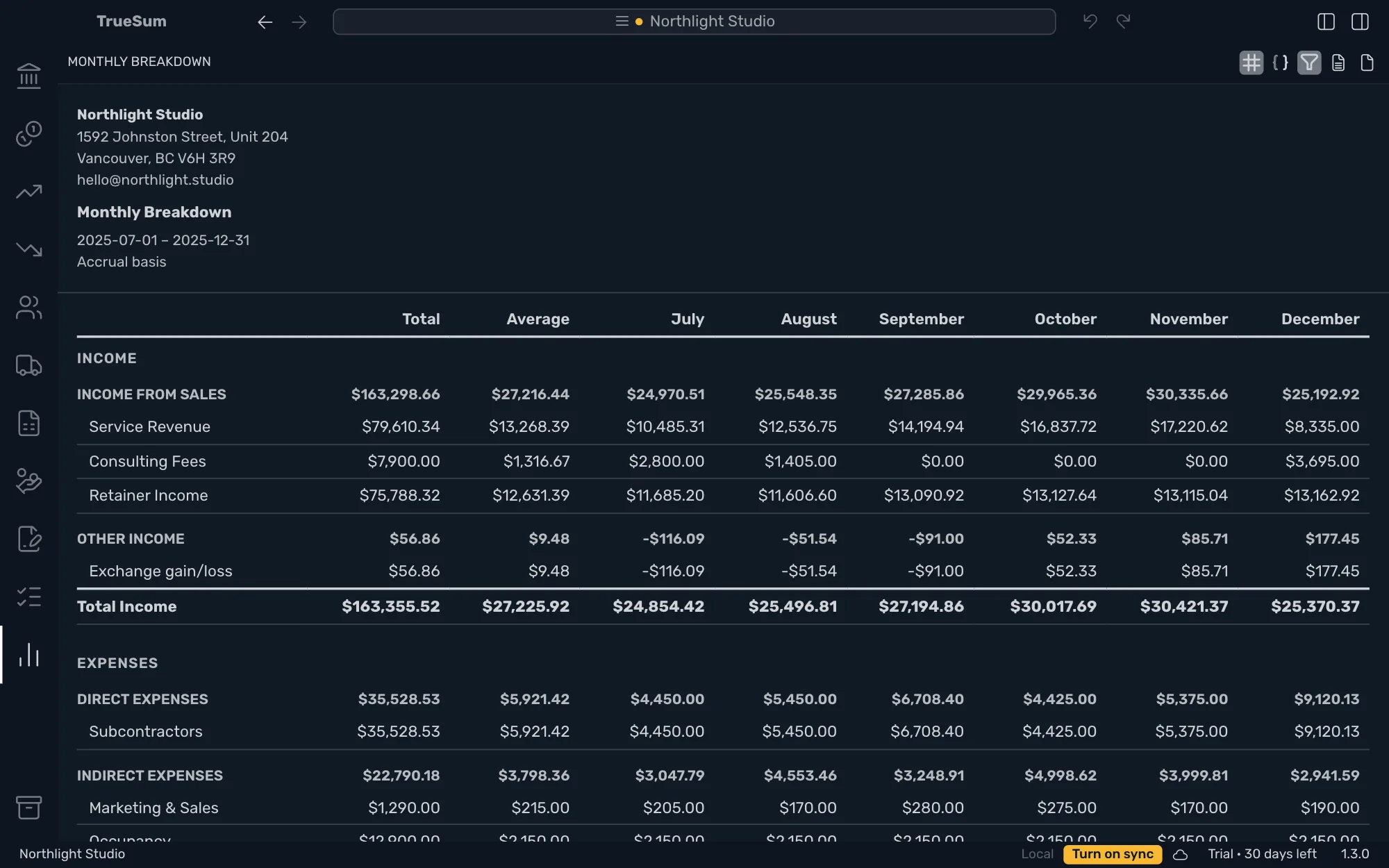
The picture shows the top of the report, with the column headers. The report is longer than the window, so Total Expenses and Net Income are further down.
Read it
The columns are Total for the whole period, Average for a month, then each month. The rows are the same as on the Profit & Loss, except that Revenue is called Income here. The rows are Income, Expenses and Net Income. Look along the Net Income row. The highest figure is the best month, and a negative one is a month with a loss.
Average is Total divided by the number of months. The note at the foot says how many, which can be a fraction if the period starts or ends inside a month.
Choose the period
Period is This Fiscal Year, Year to Date, Trailing 12 Months or Custom. It opens on This Fiscal Year.
A year has twelve month columns, more than the window shows. Hide the sidebars with Toggle Left Sidebar and Toggle Right Sidebar at the top right, or scroll sideways. The picture uses six months so every column shows.
Show individual accounts off leaves out the accounts under each group. Basis works as on every report. See Run a report. This report has no Compare with previous period.